KSR Academy

Professional Accountant Course

Become a Professional Accountant with practical training in Accounting, GST, Income Tax, and TDS.

  • Speaker Karan Singh Rathod
  • Duration 75+ Hours
  • Lessons 5 Years

4

Untitled (400 x 300 px) (3)

Validity

5 Years Validity

Certificate

YES

Module

7 Module

What we will Learn in this Course ?

This course is designed to transform learners into skilled professional accountants by covering accounting, taxation, and compliance with practical training. It is ideal for students, job seekers, and professionals aiming to build a strong career in accounting and finance.

What You Will Learn:

  • Fundamentals of accounting & bookkeeping

  • Preparation of Journal, Ledger, Trial Balance & Final Accounts

  • Balance Sheet preparation & finalization

  • Tally Prime with GST (Latest Version)

  • GST concepts & Return filing (GSTR-1, 2B And 3B, )

  • Income Tax computation & ITR 1 & 4 filing

  • TDS in Tally Prime and TDS Working 

  • Payroll accounting & compliances

  • Practical training on accounting software (Tally Prime)

Key Features:

  • 100% practical, job-oriented training

  • Real business case studies & examples

  • Covers latest rules, amendments & software training

  • Suitable for beginners and working professionals

Who Should Enroll:

  • Commerce & accounting students

  • CA/CMA/CS aspirants

  • Job seekers in accounting & taxation

  • Business owners & entrepreneurs

Key Features

Why Choose Our Professional Accountant Course?

Updated Lessons

All the video lessons in this course are created for the latest Tally Prime versions with GST.

Get ISO Certificate

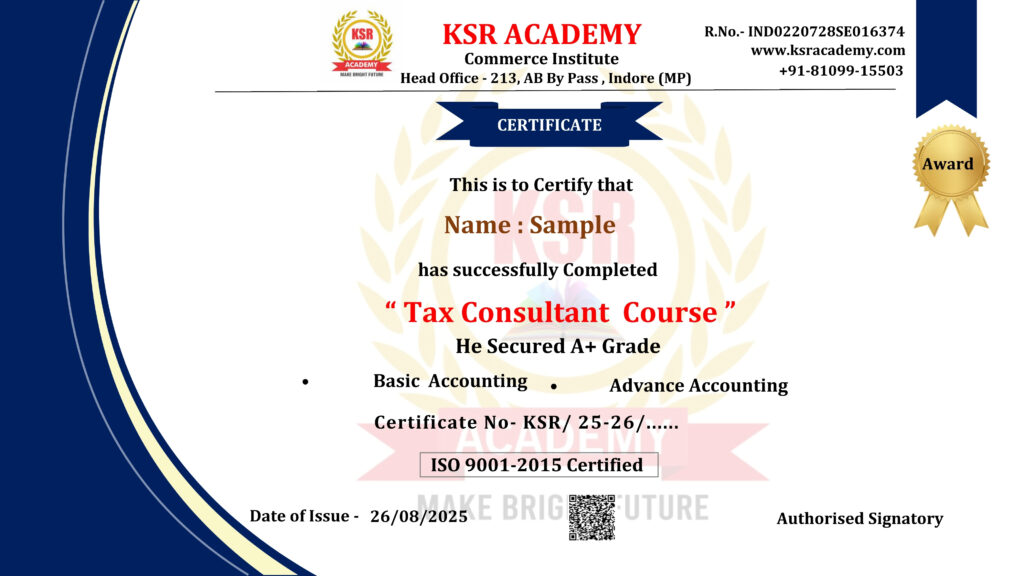
If you complete all Tax Consultant Modules & with proper practice, then you will get an ISO Certificate for free

Doubts Solution Support

Also, you can ask all your doubts after attending the daily lessons. Our team will solve each and every problem.

Become Smart

After completing this course, you will become more smarter in Accounting and Taxation can get high-paying jobs & promotions

What will you Learn in this Course ( CONTENT)

  • Lec-1 What is Accounting ? Introduction of Account
  • Lec-2 How Many Person do Business
  • Lec-3 How to record Transaction ? Golden Rule of Account
  • Lec-4 5 Pillars of Account Part-1
  • Lec. 5. 5 Pillars Of Account Part-2
  • Lec-6 How Many Transaction of Business Part-1
  • Lec-7 How Many Transaction of Business Part-2
  • Lec-8 Ledger Posting
  • Lec-9 How to Prepare Trail Balance
  • Lec-10 How To Prepare Trading and Profit and Loss Account
  • Lec-11 How to Prepare Balance Sheet
  • Lec-12 How To Prepare Trading and Profit and Loss Ac and Balance sheet from Trail balance
  • Lec-1 Introduction of Tally Prime
  • Lec-2 How to Download Tally Prime
  • Lec-3 How to Create Company , Alter, Shut , Change in Tally Prime
  • Lec-4 Ledger Create, Alter and Delete in Tally Prime
  • Lec-5 Group Creation in Tally Prime
  • Lec-6 Practical Opening Balance enter in Tally Prime
  • Lec-7 Voucher Entry -F4 Contra
  • Lec-8 Voucher Entry – F5 Payment and F6 Receipt
  • Lec-9.Voucher Entry -F9 Purchase and F8 Sales (without Inventory )
  • Lec-10 Voucher Entry -F7 Journal Voucher
  • Lec-11 Advance Feature in Voucher Entry
  • Lec-12 Inventory Master – Item, UOM, Group, Create, Alter / Delete
  • Lec-13 Sales & Purchase Record with Inventory
  • Lec-14 Bank Statement Entry in Tally Prime
  • Lec-15 What is GST ? GST Registration Limit ? Who Charge GST on Goods
  • Lect-16 What is Intra State and Inter State Purchase & Sales
  • Lec-17- Types of Tax | What is IGST,CGST,SGST
  • Lec-18 What is Input and Output Tax in GST
  • Lec-19 What is Input tax Credit
  • Lec-20 How to Activate GST in Tally Prime
  • Lec-21 How to Create GST Ledger
  • Lec-22 Create Debtors and Creditors Ledger
  • Lec-23 GST Tax Rate Setup in Stock Item and Stock Group
  • Lec-25 How to Record Sales Invoice with GST
  • Lec-26 How to Charge GST on Freight Charges in Purchase and sales Invoice with Stock Item
  • Lec-27 Trade Discount and Cash Discount Entry in Purchase and Sales Invoice
  • Lec-28 How to Deactivate Item Allocation Option in Stick Item
  • Lec-29. Buy 5 Get one Free Offer Entry in Sale Invoice
  • Lec-30 Free sample using zero-valued transaction in Sales Invoice
  • Lec-31 Specify Separate Buyer (Bill to) and Consignee (Ship to) details
  • Lec-32 What is Debit Note ? When Issue and Record Debit Note in Tally Prime
  • Lec-33 What is Credit Note ? When issue and Record Credit Note in Tally Prime
  • Lec-34 How to Record Purchase of Fixed Assets/Capital Goods Under GST
  • Lec-35 Record Expenses with GST in Purchase, Payment or Journal Voucher
  • Lec-36 Voucher Class in sales and purchase (Speed Transaction Record)
  • Lec-37 Inclusive of Tax of Item Option in Sale Invoice (Walking Client Business)
  • Lec-38 Create Sales Invoice without Party Ledger Create (Shop Accounting)
  • Lec-39 How to Give Quotation to Walking Client without Ledger Create
  • Lec-40 What is RCM ? How to Pay GST via RCM
  • Lec-41 RCM Entry in Tally Prime | RCM on Freight Charges Entry
  • Lec-42 Batch Wise ( IMEI) Stock Maintain | Electric Shop Accounting
  • Lec-43 Report – Trail Balance & Day Book
  • Lec-44 Report – Cash Book and Bank Book| How to check Day wise Negative Cash Balance
  • Lec-45 Report – Ledger and Group wise Check
  • Lec-46 Report -Sales Register and Purchase Register
  • Lec-47 Detail Analysis of Trading & Profit and Loss A/c
  • Lec-48 Detail Analysis of Balance Sheet
  • Lec-49 Details Analysis of Stock Item | Stock Summary
  • Lec-50 Bank Reconciliation in Tally Prime
  • Lec-51 Print Option | Print sales Invoice | Ledger Party
  • Lec-52 Important Short Cut Key | Insert Voucher | Create Ledger Etc
  • Lec-53 Stock Journal | Stock Transfer from One Godown to another Godown
  • Lec-54 Lecture-52 Tally Data Backup and Restore
  • Lec-55 Split Tally Data | How to DATA Split 
  • Lec-56 How to Send DATA via Mail and Whats App 
  • Lec-57 How to Open Tally DATA Received by Mail and Whats App 
  • Lec-59 How to Select DATA Path for Default Company Folder
  • Lec-60 Control user Access to Company DATA | Password Create for Open Company
  • Lec-61 Tally Data Export in PDF, Excel and JPEG Format
  • Lec-62 GST Return | How many types of GST Return
  • Lec-63 How to File GSTR-1 Part-1
  • Lec-64 GSTR-1 Return Filling on Portal Part-2
  • Lec-65 GSTR -1 IFF (Invoices Furnishing Facility)
  • Lecture-66 Filing Nil Form GSTR-1 through SMS
  • Lec-67 What is GSTR2A and GSTR-2B ,Difference between GSTR2A and 2B
  • Lec-68 How to File GSTR-3B on GST Portal
  • Lec-69 FD Interest in Tally Prime
  • Lec-1 What is Composition Scheme under GST
  • Lec-2 How to Activate GST in Tally Prime
  • Lec-3 How to Create Tax , Purchase & Sales Ledger and Stock Item
  • Lec-4 Record Purchase & Sales invoice under Composition Scheme
  • Lec-5 RCM Entry and Increase Output Tax Liability in Tally Prime
  • Lec-6 What is CMP -08 Form ? How to Calculate Tax Liability via CMP -08 form In tally Prime
  • Lec-1 How to Prepare Trading & Profit and Loss A/c and Balance Sheet
  • Lec-2 How to Finalization of Balance Sheet Part-1
  • Lec-3 Manual Balance Sheet Final Part-2
  • Lec-4 Balance Sheet Final Part-3
  • Lec-5 22 Work We have to Do while Balance sheet Final
  • Lec-6 Introduction (Must Watch)
  • Lec-7 Opening Balance Match with Audited Data
  • Lec-8 Opening Balance Match Part-2
  • Lec-9 Data Split from 01 April 2024
  • Lec.10 Ledger Scrutiny and requirement Document
  • Lec-11 PY Provision setoff Against Payment
  • Lec-12 Loan Interest Adjustment Part-1
  • Lec-13 Loan Interest Adjustment Part-2
  • Lec-14 How to Create and Adjust Provision
  • Lec-15 Cash Entry and Negative Balance Adjustment
  • Lec-16 How to Match Tally Data with 26AS , TIS & AIS Report
  • Lec-17 GST Match – Tax Liabilities and ITC comparison
  • Lec-18 GST Match – Tally Data Match with GSTR-2B
  • Lec-19 Setoff Output Tax against Input Tax Entry in Tally Prime
  • Lec-20 Match Input Tax Credit Ledger with Tally Prime
  • Lec-21 How to Calculate Depreciation and Entry in Tally Prime
  • Lec-22 Raw material convert into Finished Goods Entry in Tally Prime
  • Lec-23 How to Adjust Gross Profit and Net profit by Closing Stock
  • Lec-24 How to Adjust Advance Tax , TCS & TDS against Income Tax Payable for PY
  • Lec-25 Prepare Balance Sheet in Excel as per Schedule -3 Part-1
  • Lec-26 Prepare Balance Sheet in Excel as per Schedule -3 Part-2
  • Lec-1 Introduction of GST
  • Lec-2 Feature of GST (Pan Base System)
  • Lec-3 Introduction of RCM
  • Lec-4 RCM Entry in Tally Prime | RCM on Freight Charges Entry
  • Lec-5 Input Tax Credit Overview
  • Lec-6 Input tax Credit Part-2
  • Lec-7 Input Tax Credit Part-3 Eligibility and Condition for taking ITC
  • Lec-8 GST Registration Part-1 Liable to Registration
  • Lec-9 Practical GST Registration on Portal of Normal Taxpayer
  • Lec-10 How to Download GST Certificate
  • Lec-11 E-Way Bill Part-1
  • Lec-12 E-Way Bill Part-2
  • Lec-13 E-Invoice
  • Lec-14 GST Return overview
  • Lec-15 GSTR -1 IFF (Invoices Furnishing Facility) (Part-1)
  • Lec-16 GSTR-1 IFF Online Filling on Portal (part-2)
  • Lec-17 GSTR-1 Quarterly File by Client Excel Data Part-3
  • Lec-18 What is GSTR2A and GSTR-2B ,Difference between GSTR2A and 2B
  • Lec-19 GSTR-2b Reconciliation Tally Data Match with GSTR-2B in Tally Prime
  • Lec-20 How to FIle GSTR-3B on GST Portal
  • Lec-1 What is TDS and TCS ? TDS Overview
  • Lec-2 TDS Section 192A,193,194,194A,194B and 194BB,
  • Lec-3 TDS Section-194C,194D,194DA,194G,194H,
  • Lec-4 TDS Section – 194I,194IA,194IB,194J,194M,194N,194T
  • Lec-5 Interest and Penalty of Late Payment and Late return File
  • Lec-6 What is TCS and Rate of TCS
  • Lec-7 TDS Entry in Tally Prime
  • Lec-1 Introduction of Income Tax
  • Lec-2 How to Compute Total Income (Levy Of Tax)
  • Lec-3 Slab Rate of Income Tax (old and New Tax Regime)
  • Lec-4 Mandatory Returns Filling Sec. 139(1)
  • Lec-5 Filing of Return in the case of a loss –u/s 139(3)
  • Lec-6 Belated Return u/s 139(4) and Revised Return u/s 139(5)2
  • Lec-7 ITR filing due dates for FY 2024-25 (AY 2025-26)
  • Lec-8 How to Apply New Pan Card online
  • Lec-9 Required Document for Income Tax Return
  • Lec-10 Which Return have to file ?
  • Lec-11 What is 26AS Form and How to Download From Income Tax Portal
  • Lec-12 What is AIS and How to Download from Portal
  • Lec-13 ITR-1 Filling though Form 16 (New Tax Regime)
  • Lec-14 ITR-1 Filling without Form 16 (New Tax Regime)
  • Lec-15 ITR-1 Filling (Old Tax Regime) Part-1
  • Lec-16 ITR-1 Filling (Old Tax Regime) (Part-2)
  • Lec-17 ITR -4 Filling with Excel utility For FY 24-25
  • Lec-18 ITR-4 Filling FY 24-25 Online , Computation & Balance Sheet 
  • Lec-1 Overview of Payroll
  • Lec-2 How to Activate Payroll in Tally Prime
  • Lec-3 How to Create Employee Group
  • Lec-4 How to Create Employee Name Signal and Multiple
  • Lec-5 How to Create Single and Multiple Unit (work)
  • Lec-6 How to Create Attendance /Production Type
  • Lec-7.Create Employee Earning Pay heads
  • Lec-8 Create Employee Statutory Deduction by Employer
  • Lec-9 Create Employer’s Contribution Pay Heads
  • Lec-10 Other Deduction Pay heads from Employee Salary
  • Lect-11 Define Salary Structure for Employees and Employee Groups
  • Lec-12 Create Attendance or Production Vouchers
  • Lec-13 Calculate Monthly Salary Payable
  • Lec-14 Income Tax Declarations in Tally Prime
  • Lec-15 Employer Contribution and Payment
  • Lec-16 Advance Salary and Setoff against Salary Payable
  • Lec-17  TDS on Salary and Provide Form 16
  • Lec-18.How to Prepare Salary Sheet in Excel

course completion certificate

Demo Videos

Get Bonuses Worth ₹ 8,500 with this Course​

Excel Mastery Course

Basic Excel with Pivot Table, V lookup , H-Lookup and many Advance Formula

Word Mastery Course

Microsoft Word with Basic to Advance Letter Writing , Printing option etc

Power point Mastery Course

Power Point Presentation Prepare Create Youtube Thumbnail, Instragram Post

Why Students Love KSR Academy

Whether it’s a first brush on canvas or the last frame in an animation, Skillshare is here to support you on every step of your creative journey.

Frequently Asked Questions

Click on Enroll Now Button. > Clicking the Course Page will Open> Click on Get this course. > Fill Detail and Verify Mobile number with Mobile OTP. > Make payment via UPI, Debit card and Credit Card> After payment you will get access immediately.

Yes ! You can Download Videos in Mobile Application, You Can watch it in Offline Mode without Internet.

For Laptop or PC Visit www.ksracademy.com >click on Login > Enter your Registered mobile number > Verify OTP with Registered Mobile Number.

Yes ! you will have our WhatsApp support.

The validity of the course is 5 Years.

Yes, you will get Accounting, Tally Prime eBook and practice file.

Yes ! You will Get A Certificate.

There is No Refund Policy.

There will be a live doubt session Monday to Friday 8PM.